Finished for now?
Choose one more
paper puzzle.
Keep a small choice of original worksheets ready for children who finish a task before the next shared activity. Choose a page, explain its instructions once, and decide how it will be checked.
Decide what happens after “I’m finished.”
Prepare a small set of optional activities before the session. Once a child has completed the current task, offer a page that can be started from its own printed instructions. These picture puzzles offer an optional choice alongside your existing classroom task. Pick the pages that suit your group and explain how you want them to be used.
- Choose the available pages. This sample uses picture counting and picture pairs. A maze, drawing prompt or English word hunt can be another choice from the same maker.
- Explain the routine. Show where pages and pencils are kept, what to do when a page is finished, and where an unfinished sheet should go.
- Decide how to check. Keep answer pages with the teacher, or make one answer copy available for an agreed self-checking routine. The PDF keeps those answers attached to the correct activities.
Difficulty is a puzzle choice, independent of the number of pages. Choose by comfort and English reading rather than assuming everyone in a class needs the same level. Read instructions aloud for picture-led tasks when useful.
Count one target, or match one group.
- Picture counting
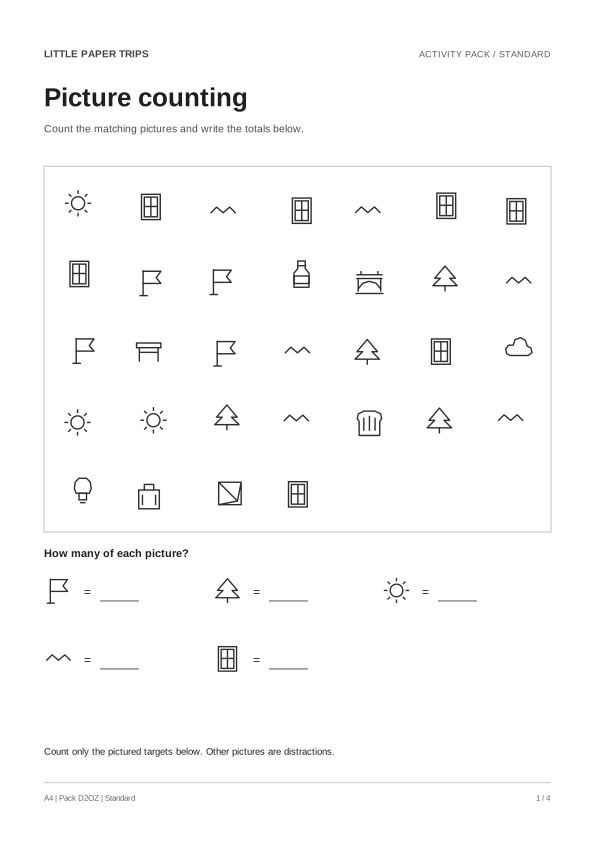
- Find the target pictures shown below the field and write each total beside its clue. In Standard, extra pictures are distractions. Count one target at a time; a second pass can check the total.
- Picture pairs
- Match each lettered group on the left to a numbered group on the right. The pictures inside a group can appear in a different order. Draw a line, or write the number beside the letter.
Two checks from the actual sample
The first counting target is A flag. Its total in this sample is 4. Other kinds of pictures are not part of that total.
On the picture-pairs page, group A matches group 4. Compare every picture in the group, not only the first one. The attached answer pages contain the complete checks.
The sample has no place for a child’s name and the website asks for no pupil information. Use your existing classroom method to distribute or store printed work; nothing is uploaded to this activity app.
Print activities and checking copies separately.
For the sample below, print pages 1–2 for the activities and pages 3–4 for the answers. Each child can use one selected sheet; keep a full checking copy aside. Both A4 and US Letter versions have their own page dimensions and grayscale artwork.
If you make your own combination, use the page ranges displayed beside Download in the maker. Different selections can produce different answer-page totals. Do not reuse an answer sheet from another New pack generation: its counts, groups or maze can be different.
A finished puzzle can be followed by a simple explanation: which target was counted, which pictures made a pair, or which clue helped. There is no required speed or score, and the website does not record who completed a page.
Refresh the choice without rebuilding a worksheet.
In the common pack maker, select Picture counting and Picture pairs, choose Standard, and choose the paper in your printer. Preview the pages and answers. Use New pack for a fresh set, then save that PDF for later printing.
The sample is fixed and the maker’s set is generated locally in your browser. For a reading-based choice, the word search guide explains the English word list and allowed directions. The maze guide shows a smaller worked example before a child starts a maze page.
See the pages before you print.
Standard picture counting + Picture pairs. Both downloads contain these two activities followed by two matching answer pages. The examples are fixed; use the maker to generate another set.
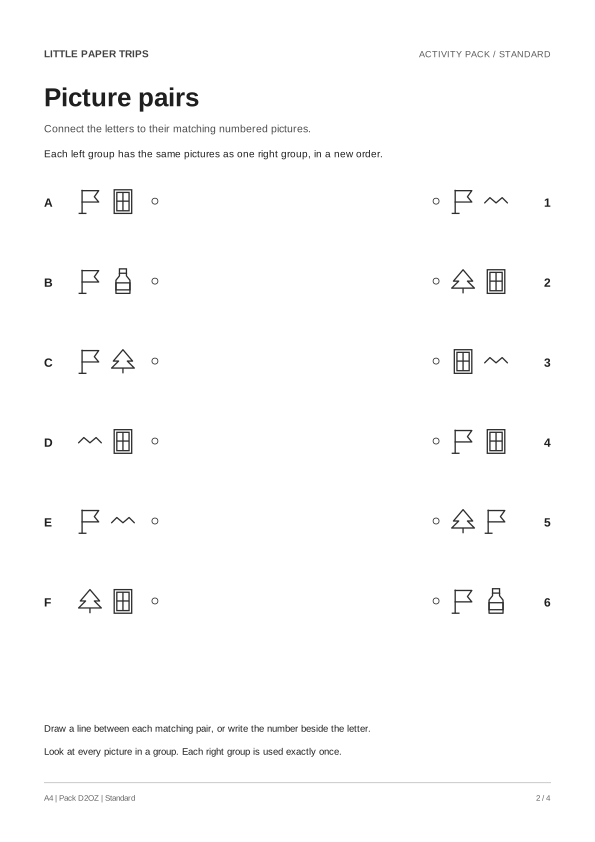
These vector previews use the same drawing layout as the A4 PDF. Open a sample PDF for a full-size view. The US Letter download contains the same puzzles laid out on US Letter paper.
A fresh set when you want one.
The common maker lets you choose activities, difficulty and paper. PDF generation runs in your browser. The activity app asks for no child name, birthdate, age or photo, and has no upload or account flow. Hosting has its own technical data practices, described in the existing privacy notes.
Make your free pack