A route to find,
a page to keep.
Choose a small or detailed maze, preview its passages and download a grayscale PDF with the solution attached. No name, age or player account is needed by the activity app.
Make a maze packHow the printable maze works
Start at the opening above the top-left cell and finish through the opening below the bottom-right cell. Trace through open passages without crossing the walls. The generated maze has one route between those entrances, and its answer draws that route on the same maze.
You can use a finger to explore on the preview, or work with a pencil after downloading and printing. The website preview is a view of the worksheet, rather than a game that records your moves.
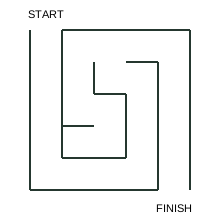
Try one small route
Begin at START. Travel between the walls and leave at FINISH. A wall is a line you cannot cross; an opening is a gap you can move through.
Mini-maze solution in words
Enter the top-left cell. Move down 4 cells, then right 3 cells, then up 3 cells, then left 1 cell, then up 1 cell, then right 2 cells, then down 4 cells, then leave through the bottom opening. Each move travels from the centre of one cell to the next.
This teaching example is smaller than the downloadable Easy maze. Your generated PDF uses the level you choose.
Three maze sizes
- Easy · 10 × 10 cells
- Suggested 5+ with shared reading. A smaller grid gives more space to see each passage. Read START and FINISH together if needed.
- Standard · 15 × 15 cells
- Suggested 8+ with independent reading. More branches make it useful to check an opening before following it.
- Challenge · 21 × 21 cells
- Suggested 12+ and adults. A denser grid offers a longer search through possible passages. Choose by comfort, not age alone.
New pack changes the maze walls and route. The entrance and exit positions stay fixed. Refreshing the page returns to the checked sample, while Download keeps the exact maze currently shown.
Make a maze-only PDF
- Use Make a maze pack below. It opens the common maker with only Maze selected.
- Choose Easy, Standard or Challenge and A4 or US Letter. You can add other activities with the checkboxes.
- Preview the maze and answer, then download. A maze-only selection produces one activity page plus one answer page.
The answer is automatically attached to that PDF; it is not a separate file and never belongs to a different regeneration. The maker shows the page range if you want to set the answer aside.
Paper, ink and useful habits
A4 and US Letter use their own page dimensions. Both keep at least a half-inch safe margin around the vector drawing and text. Ink-light mode leaves the header white, and all maze lines print in grayscale.
Try tracing backwards from FINISH if a branch is hard to follow. If your pencil reaches a closed end, return to the last junction. This is an optional solving habit, not a scored or timed task.
For a reading puzzle to go with it, see the word search guide. For the complete activity mix and download steps, see the activity pack guide.
Ready for a little paper adventure?
Choose the pages that suit you. The preview and download use the same puzzles, and their matching answers travel in the same PDF.
Make a maze pack